Chocolate skin effect - 10 May 2011 - Poetry, Writings, Art, Design
Wednesday, 2013-06-19, 6:53 PM

Creativity comes from simplifying

Main | Registration | Login
Welcome Guest
RSS
MY TUTORIALS ON OTHER SITES
  • Create a serene lake scene photo manipulation

  • Create a dark photo manipulation of a devil woman

  • Design a summer time vacation poster

  • Create a space battle scene in Photoshop

  • Create a garden scene with a cat gazing at a fish cloud

  • Create a beautiful mixed media portrait in photoshop

  • Create a bunny house in photoshop

  • Create a Surreal Head Of Tree Photo Manipulation

  • Create a Dark and Surreal Photo Manipulation "Volcano Spirit"

  • Create a Mysterious and Fantasy Woman Portrait in Photoshop

  • Create a Snowy Night Landscape Matte Painting

  • Create a Christmas night landscape photo manipulation

  • Create a colorful photo manipulation "Simple Life"

  • Create a fantasy forest fire scene photo manipulation

  • Create a floating superhero scene with sci-fi lighting effect

  • Create a Beautiful Abstract Cosmic Photo Manipulation

  • Create a Nature Inspired Advertisement Design

  • Create a Dark Ghostly Scene Photo Manipulation

  • Create a Fantasy Witch Scene Photo Manipulation

  • Create a fantasy halloween witch cat photo manipulation

  • Create a beautiful sunrise landscape matte painting in photoshop

  • Create a Surreal Photo Manipulation "Flooded"

  • Create a Surreal Portal Scene with Powerful Lighting effect

  • Create a Sci-fi photo manipulation "Space Station"

  • Create emotional photo manipulation "Magical Rose"

  • Create An Eerie Abstract Photo Manipulation

  • Create a Surreal Photo Manipulation Sky Gate

  • Create a Fantasy Mushroom House Photo Manipulation

  • Create a Surreal Photo Manipulation "Daydream"

  • Create a Dark Photo Manipulation "Nocturna"

  • Create an emotional sunset photo manipulation

  • Create a cat in a magical pond scene photo manipulation

  • Create a surreal photo manipulation Coffee Mind

  • Create a Fantasy floating park photo manipulation

  • Twisting Water-Surreal photo manipulation

  • Firing Heart-Emotional photo manipulation

  • Create a dramatic building explosion scene

  • Let me sink-Emotional rainy scene photo manipulation

  • Create a colorful and futuristic photo manipulation

  • The Sky Station - Surreal photo manipulation

  • The Vampire Hunter - Dark photo manipulation

  • Dark storm scene photo manipulation

  • The Released - Dark and surreal photo manipulation

  • Wounded rose - Create an abstract photo manipulation

  • Create a dark and emotional photo manipulation

  • Create a dramatic battle scene in photoshop

  • The Forgotten - Dark an conceptual photo manipulation

  • Night's butterfly-Create a dark and mysterious fantasy portrait

  • Create an anti-smoking concept design in photoshop

  • A dreamy world-Create a fantasy landscape

  • Create a dramatic action scene poster

  • Create a nature inspired, out of bound photo effect in photoshop

  • Cool metal text effect

  • Dance in blue - Fantasy photo manipulation

  • Emotional night scene - Photo manipulation

  • Create a lovely 3D like butterfly in Photoshop

  • Create a beautiful Valentine background with moon and heart

  • Create a beautiful and romantic Valentine wallpaper

  • Beautiful pink flower portrait

  • Create a beautiful spring greeting card in photoshop

  • Beautiful spring-Fantasy photo manipulation

  • Cool floral 3D text effect

  • Colorful bokeh heart effect

  • Retro artistic effects

  • Sexy ghost in the uninhabited house-Dark photo manipulation

  • Colorful and glamour composition style in photoshop

  • Glowing text in colorful fantastic space scene

  • Magical blossom dance-Fantasy photo manipulation

  • RECENT TALKS

    Rachel, when you mak...


    how do you do that? ...

    Did you change the m...

    TAGS
    Misc sparkling graphics glitter Photoshop tutorial Random thoughts NIGHT Snow icon My story Effect Mandy Moore Story flower Stock Pink Autumn background special effect Text effect photo wallpaper Winter Text effects Fantasy Blood drawing GHost light Asadal green freebie pattern angel Rain Soft Fallen Design Creative Fonts Colorful Background photoshop Heart frame FLY romantic Beautiful photos Life Beautiful girl Cosmic Calligraphy Photo retouch Woman Inspiration script Nature Feeling rose Beauty model music Mood yellow girl gif digital dark BANNER Sad vector red season Forest spring Blue Sky love missing color violet colorful butterfly Photo effect star Blend painting Skin actress Dreamy glowing Portrait abstract Surreal Photo manipulation Penelope Cruz Sweet face My poetry font
    ARCHIEVES
    SEARCH


    RECENT POSTS
    [2013-05-21]
    Free star backgrounds
    [2013-03-07]
    Create a colorful abstract cosmic photo manipulation
    [2013-03-05]
    Free abstract shapes and light streaks
    [2012-05-20]
    On My Road - Surreal Photo Manipulation
    [2012-03-07]
    Create a Nature themed, Astract photo manipulation
    MOST POPULAR
    [2010-07-26]
    Complete portrait retouching
    Views: 63694
    [2011-01-31]
    Create beautiful glowing flowers
    Views: 55670
    [2010-11-15]
    25 beautiful dreamy effect photoshop tutorials
    Views: 55583
    [2010-11-26]
    The enchanted forest- Fantasy photo manipulation
    Views: 54150
    [2011-01-15]
    Color blending collection 3
    Views: 42838
    [2012-05-20]
    On My Road - Surreal Photo Manipulation
    Views: 40329
    [2011-06-14]
    Create a burning girl with fire effect
    Views: 39975
    [2010-08-22]
    Color blending collection I
    Views: 39953
    [2010-03-15]
    Beautify a portrait
    Views: 38307
    [2010-05-29]
    Enhance portrait photo with natural look
    Views: 36664
    MOST TALKED
    [2012-05-20]
    On My Road - Surreal Photo Manipulation
    Opinions : 104
    [2013-05-21]
    Free star backgrounds
    Opinions : 96
    [2010-11-26]
    The enchanted forest- Fantasy photo manipulation
    Opinions : 81
    [2011-01-31]
    Create beautiful glowing flowers
    Opinions : 80
    [2011-06-14]
    Create a burning girl with fire effect
    Opinions : 68
    [2010-12-06]
    The Winter Queen - Fantasy photo manipulation
    Opinions : 47
    [2010-10-10]
    Create a beautiful emotional black and white love scene
    Opinions : 44
    [2010-03-15]
    Beautify a portrait
    Opinions : 43
    [2010-07-06]
    Create beautiful golden skin effect using three different ways
    Opinions : 39
    [2010-07-26]
    Complete portrait retouching
    Opinions : 36
    RANDOM POSTS
    [2010-11-05]
    Glowing flowers - My new drawing
    [2010-03-08]
    Sweet orange tone
    [2010-04-08]
    Love story of two pillows
    [2010-04-23]
    Create quickly interesting effects with combination Ctrl+Alt+~ in photoshop
    [2010-04-07]
    Create a resplendent city night
    MY FAVORITE SITES
  • PSD Tutsplus
  • FanExtra network
  • Webmaster tutorials
  • Typography resources
  • STATISTICS

    Total online: 5
    Guests: 5
    Users: 0
    Main » 2011 » May » 10 » Chocolate skin effect


    8:23 PM
    Chocolate skin effect

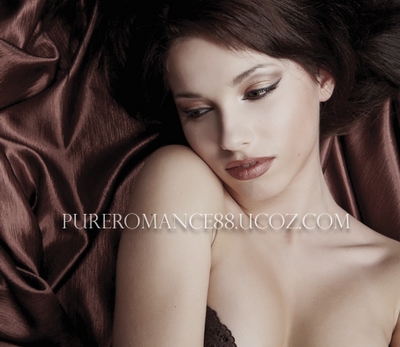
    A short tutorial in busy time . In this tutorial i will show you how to achieve sweet chocolate effect for 

    skin tone. This effect is suitable for portrait and get better result with
    background that has contrast between highlight and shadow as you see in
    stocks i use below.

    Stock:
    Model  

    1. Open your model stock. As you see, the background of this photo has

    highlight and shadow so it will get better and natural at the end.
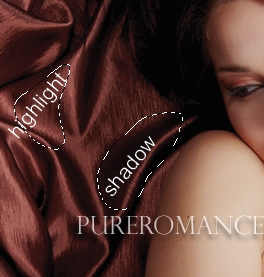

    You should retouch skin ( soften, remove blemishes...) before apply this effect. If you dont know how to retouch, just follow my retouch tutorial or find many good tutorials over the web.

    As i use model with a pretty perfect skin so i skip this step.

    Create a new Brightness/Contrast layer:
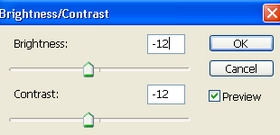
    The stock i use has high contrast on model face so i must 

    reduce it.
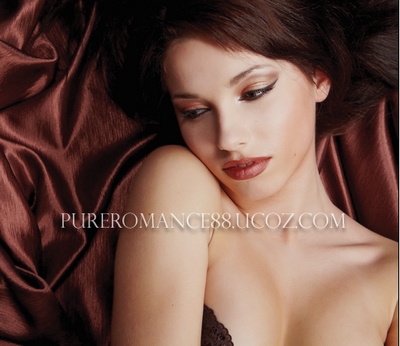
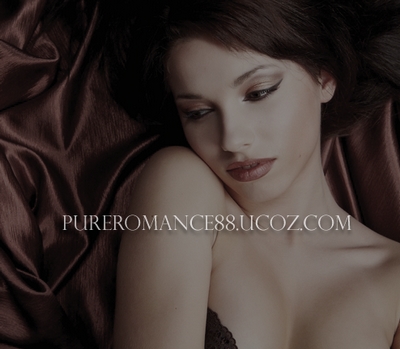
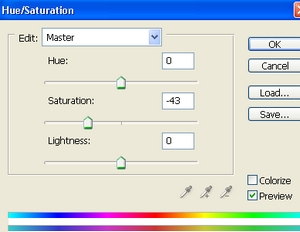
    2. Create a new Hue/Saturation layer, desaturate the picture. It depends on how saturated your photo is. For my own, i use this parameter:
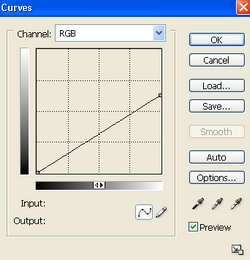
    3. In this step i use Curves to reduce the light on whole picture:
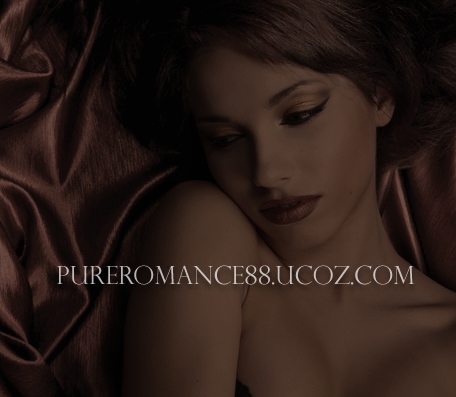
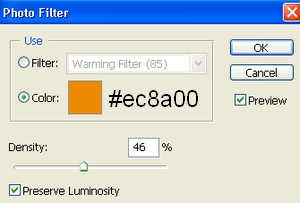
    4. Create a new Photo Filter layer to add warm tone for picture:

    You can increase or decrease this value depending on your own photo.
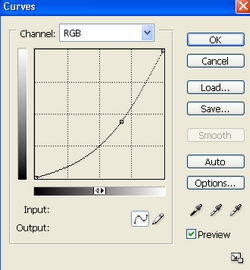
    5. In this step we will use Curves again to get chocolate skin:
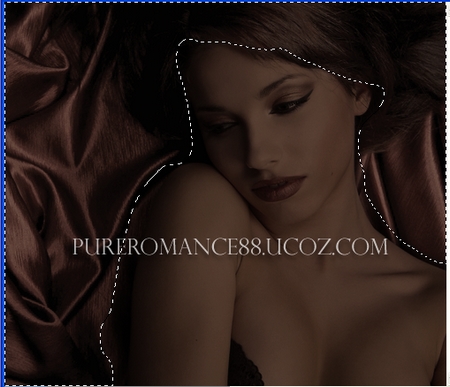
    Then use soft black brush to erase background:
    6. Create a new layer, use soft brush, color #f3d6ad to paint on eyelids , then set this layer to Soft light 20%:
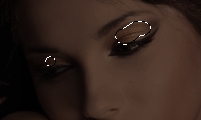
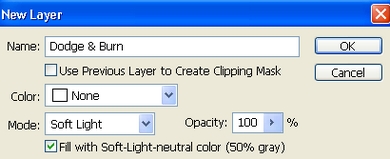
    7. Create a new layer with Soft light mode:
    Use Dodge tool to make highlight on eyelids, lips, cheek, neck, arm center, and Burn tool to darken arm sides, forehead, breast:
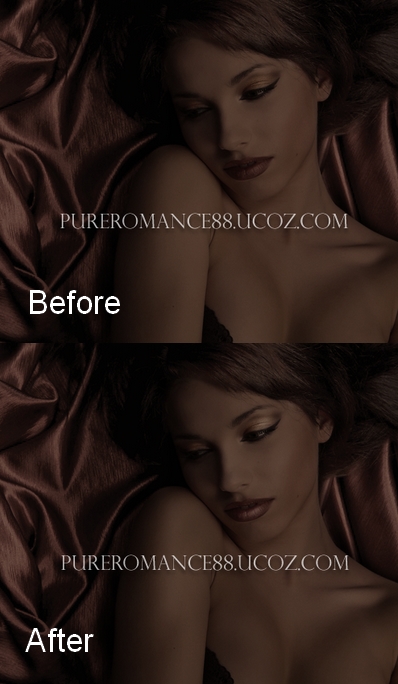
    Depending on your picture you can use Dodge and Burn for approriate parts. 

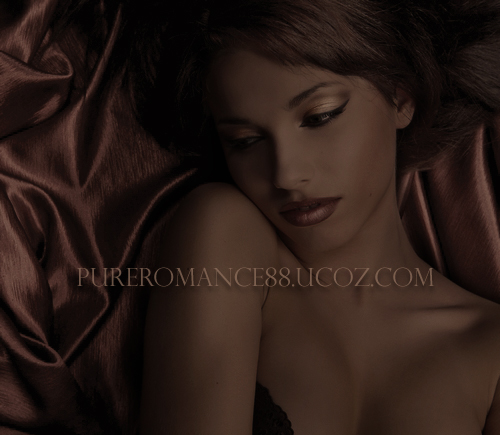
    8. Last step: new Brightness/Contrast layer again to increase highlight then use soft black brush to keep the dark parts as shown below:
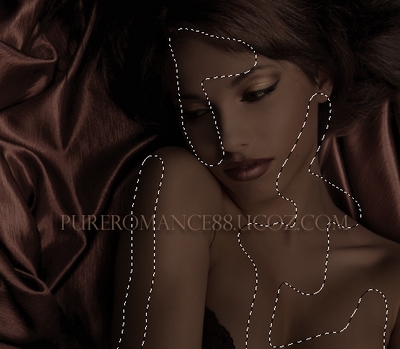
    Final Result:


    Views: 20728 | Added by: Admin | Tags: Skin, Photo effect, photoshop, Photo retouch, Photoshop tutorial, Chocolate, Beauty, Portrait, dark

    ABOUT ME: I'm Jenny and i live in Hanoi, Vietnam. If you like what i write or want to keep in touch with me, you can subscribe to My blog, email me or like My Facebook page to keep updates of my latest works.

    Please ask before you want to post or translate my tutorials on other sites. I hardly decline if you ask nicely. Thank you :).

    Share
    Share |
    Total opinions: 19
    0  
    1 Miriam   (2011-05-13 4:19 PM)
    What a sweet effect! cool

    0  
    3 Admin   (2011-05-14 10:30 AM)
    thanks biggrin

    0  
    2 CD   (2011-05-14 1:50 AM)
    the curves says that your picture is very unexposed and the final result looks weird but good try

    0  
    4 Admin   (2011-05-14 10:30 AM)
    i dont think so but thanks for comment anyway wink

    0  
    5 ravinder   (2011-05-16 1:45 AM)
    good work, make your website, logo, icons, apllication, animation and all kinds of web and print media works al low price www.kashyapdesigners.com kashyapdesigner@yahoo.com ravinder

    0  
    6 Vi Luong   (2011-05-25 2:59 AM)
    Kho qua T_T

    0  
    8 Admin   (2011-05-27 0:02 AM)
    khó quá?

    0  
    7 Jack   (2011-05-26 4:15 PM)
    These are usual techniques, yet another wonderful effect from you jenny. Looks like chocolate lady..Wonderful work from you.

    -------------------------------------------------
    http://www.deepetch.com
    Clipping path service and more

    0  
    9 Admin   (2011-05-27 0:03 AM)
    ah thanks ^ ^. Good to hear from you again Jack wink

    0  
    10 ali   (2011-06-07 12:18 PM)
    Kho qua =.=

    0  
    11 Admin   (2011-06-08 10:51 PM)
    do you really know what is the meaning of these vietnamese words??? lol

    0  
    12 reyna alejandra salinas castro   (2011-06-26 12:40 PM)
    esta muy padre

    0  
    13 Admin   (2011-07-05 11:28 AM)
    english pls.

    0  
    14 Clipping Design   (2011-11-12 5:57 PM)
    What a brilliant post. Fabulous. Keep it up.

    0  
    15 Admin   (2011-12-30 9:57 PM)
    thanks a lot biggrin

    0  
    16 Hoàng Minh Xuân   (2012-02-09 0:24 AM)
    Rất tuyệt ! Cảm ơn bạn đã chia sẻ smile

    0  
    17 Admin   (2012-02-13 4:52 PM)
    you're welcome wink

    Something you should read before leaving your words:

    1. Pls use English or Vietnamese only which i can understand. Comments with another languages will be deleted.

    2. Pls be kind. You can say your own thinkings, opinions, ideas even negative ones, but i don't accept the rudeness or if you lack the respect to me and my readers.
    3. Pls don't use only emoticons or one word "hi" to represent your voice. All of such comments will be deleted. If you really want to say something, why don't leave more impressions?
    4. No spam, advertisement ( cheap host, back link...) or stuffs that are not relevant to me or my blog content. Comments are always pre-moderated so the spams will not get any chances to be published.
    5. Pls don't ask if they are not relevant to my blog content ( for example: ask me to help to do an effect on another site). I've been so busy so hard to follow such requests.
    6. Html code for comment board is disabled. So pls don't use it here. But if you want to leave the link of your site here, just do it with prefix http://. For example http://www.google.com. Is it simple, isn't it ?
    And now, have fun!


    Name *:
    Email:
    Code *:

    Copyright MyCorp © 2013
    Free web hosting - uCoz
    ?if()?>?endif?>2s5164>-->Log out